AryonForge
Updated August 13, 2026

Attachment Policy Manager for Jira

Jira   v1.4.0 · Released

Per-project attachment rules for Jira — block or allow by extension, cap by size, exempt service accounts — with a monitor mode, a simulator, and a full audit trail.

Jira · Forge app No external egress No sale of customer data Project settings
01

Overview

Project administrators configure a policy on a project settings page. When a file that breaks the policy is attached to an issue, the app deletes it, mentions the uploader in a comment explaining why, and records the event.

Because the app’s only lever is deletion, it has three modes rather than an on/off switch — off, monitor, enforce — so a destructive policy can be observed against real traffic before it removes anything.

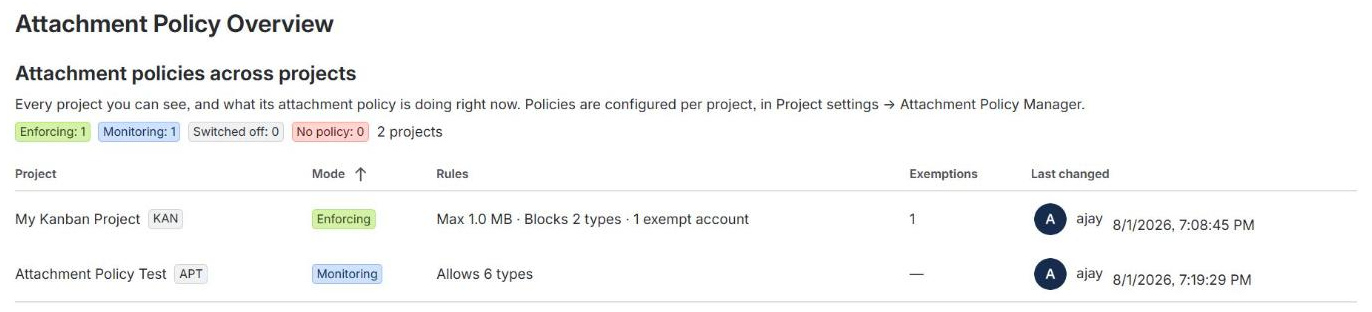
A cross-project overview gives Jira administrators every project’s mode, rules and exemptions side by side, including projects with no policy at all.

02

Highlights

Three modes, not a switch

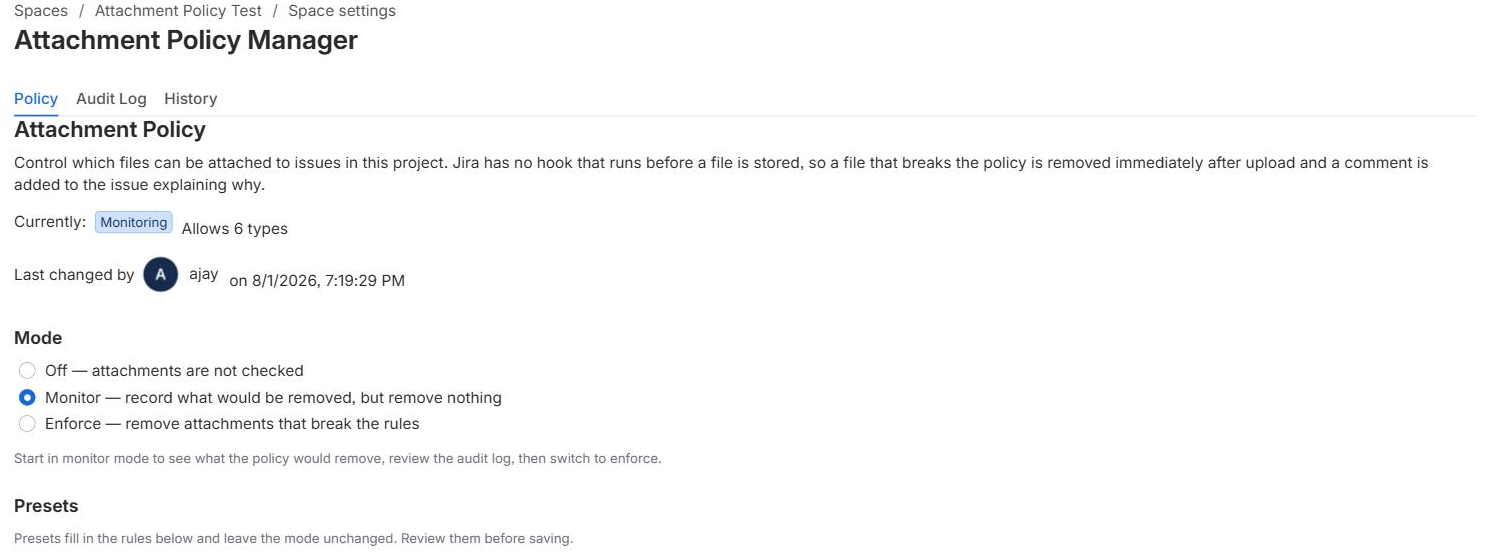
Off checks nothing. Monitor records the violation and leaves the file. Enforce deletes it, records it, and mentions the uploader. Monitor mode is the intended way to roll a policy out.

A simulator that cannot disagree with reality

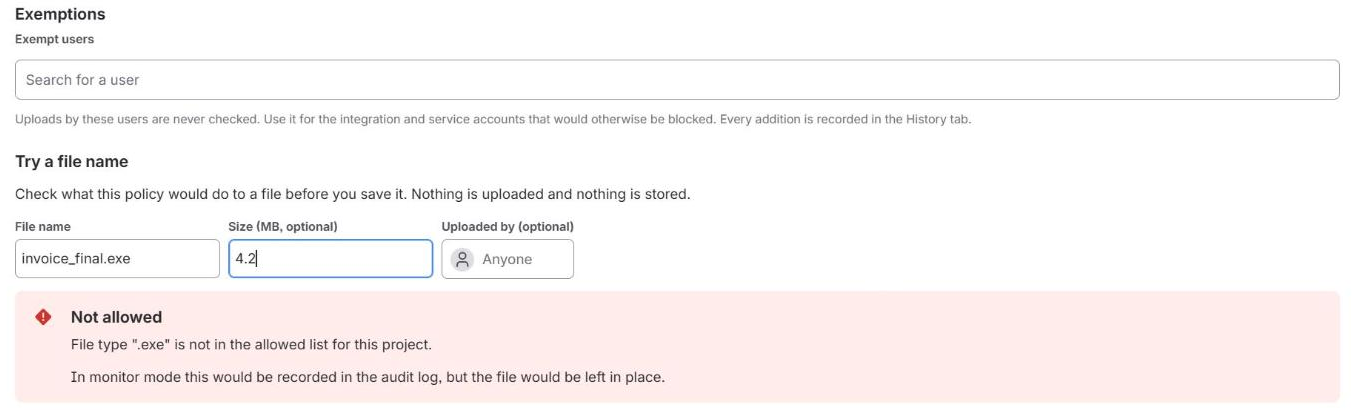
Type a file name and size on the settings page and see the verdict immediately — against the policy currently on screen, including unsaved edits, running the exact same evaluation function the trigger calls.

Double-extension and confusable resistance

The block list matches every dotted segment, so invoice.exe.txt is caught by blocking exe. File names are Unicode-normalised (NFKC) before any matching, so a full-width lookalike cannot slip past an ASCII rule.

Two logs, both attributed

An audit log of every attachment the policy acted on, and a change log of every edit an administrator made to the policy itself — including exemptions added, which is the quietest way to bypass enforcement.

Cross-project overview

Every project’s mode, rules and exemptions in one table, for site administrators only. A project administrator has no business reading how every other project is configured.

Exemptions by user picker

Exempt accounts are chosen from a picker rather than typed as opaque IDs, because a mistyped account ID fails silently — it just never matches an uploader.

Free, and fully functional

The app launched free on the Atlassian Marketplace in 1.4.0. Enforcement runs on every install, policy changes are unrestricted, and no licensing banner is shown. It is intended to become paid later; that change will be announced in-app well before it takes effect, and policies and audit history are never deleted by a licensing change.

03

How rules are applied

First failure wins, in this order: mode is off → exempt uploader → blocked extensions → allowed extensions → maximum size.

The block list is matched against every extension segment in the name, so a file presenting itself as .txt is still caught by a blocked exe. The allow list is matched only against the file’s true final extension, read from the raw final segment rather than the last one the parser could make sense of — so report.pdf.<40 characters> cannot borrow the extension in front of it.

Trailing dots and spaces are stripped first, because Windows drops them when storing a file: report.pdf. really is report.pdf and refusing it would be a false positive.

Enforcement is reactive, not preventive. Jira exposes no hook that runs before an attachment is stored, so a violating file exists for a moment before the trigger removes it. This is a platform constraint, not a design choice — and it is exactly why monitor mode exists.

04

Screenshots

The per-project policy settings screen
The simulator showing a verdict for a test file name and size
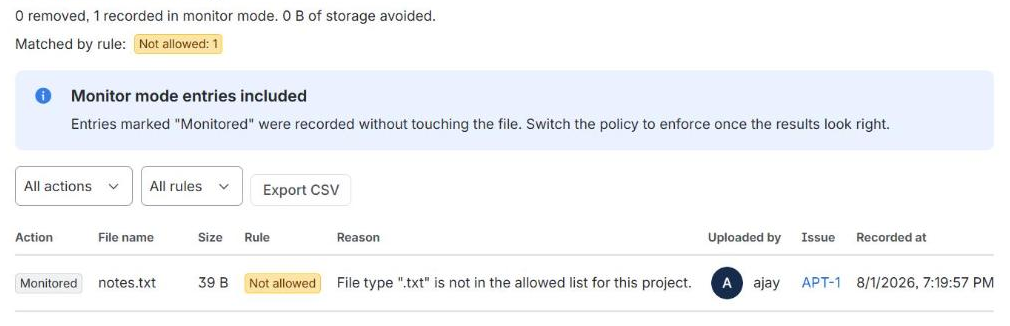
The audit log of attachments the policy has acted on
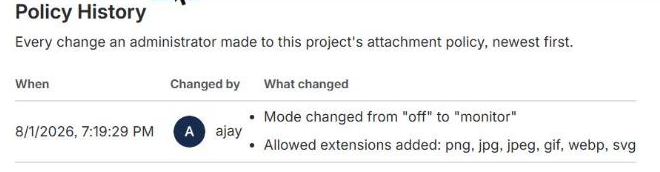
The policy change history, with attribution
The cross-project overview for Jira administrators
05

User guide

Who this is forProject administrators configuring a policy, and Jira administrators reviewing the site. No Forge knowledge assumed.

The app watches attachments uploaded to issues in your project. When a file breaks the rules you set, it can delete it, explain why in a comment that mentions whoever uploaded it, and record what happened. It cannot stop the upload — Jira offers no hook that runs before a file is stored — so treat it as cleanup and deterrence, not as a gate.

SurfaceWhere to find it
Policy, audit log, historyProject settings → Attachment Policy Manager. On sites using Jira’s newer wording, “project” reads as space: the same page sits under Space settings → Apps
Cross-project overviewSettings (gear) → Apps → Attachment Policy Overview — Jira administrators only
  1. Start in monitor mode

    Open Project settings → Attachment Policy Manager and set Mode to Monitor. Switching a destructive policy on across a live project and hoping is not a plan.

    Project administrators and Jira administrators can both use the page. Both count because a Jira administrator often does not hold the project permission: on a company-managed project it is granted to the Administrators project role, which is frequently empty.

  2. Add your rules, or start from a preset

    Four presets are offered — Block executables, Images only, Documents only and Cap size at 10 MB. Each fills in the rule fields and leaves the mode alone, so applying one can never switch enforcement on by surprise. Nothing is saved until you click Save policy.

    Review what a preset filled in before saving. Documents only on a project where people share screenshots will delete every screenshot.

  3. Check the rules against names you expect

    Type a file name — and optionally a size — under Try a file name. The verdict appears immediately, against the rules currently on screen including edits you have not saved, running the same code the enforcement trigger uses.

    Uploaded by is optional. Leave it blank for the verdict an ordinary user would get; name someone to check whether their exemption applies — the only way to confirm an exemption without asking them to upload something.

  4. Save, and leave it for a week

    The top of the Policy tab always says what is stored — the mode, a one-line summary of the rules, and who last changed them — which is a different question from what is currently typed into the form. While the two differ, an Unsaved changes marker appears and a Discard changes button appears beside Save.

  5. Read the audit log before you enforce anything

    In monitor mode every row is a file that would have been deleted. This step is not optional in spirit: the audit log in monitor mode is the only way to find out what your rules actually match before they start deleting.

    If the list contains something you did not intend to catch — a build artefact, a legitimate archive, an integration’s upload — fix the rules or exempt the account, then wait again.

  6. Switch to enforce

    When the audit log contains only what you meant, set Mode to Enforce. From then on a violating file is deleted, the violation recorded, and the uploader mentioned in a comment explaining why.

    A mode other than Off needs at least one rule; the app refuses to save an enforcing policy that would catch nothing, because it would sit there looking like protection. Off with rules configured is allowed, and is the right way to park a policy you are not ready to run.

The rules, in the order they apply

  • 1. Exempt users. Uploads from these accounts are never checked, whatever the rules say — chosen from a picker rather than typed as opaque IDs. Use it for integrations and service accounts: a CI job attaching a .jar build artefact is not a threat, and blocking it breaks the build rather than improving security. Every addition is recorded in History with the account that made it.
  • 2. Blocked extensions. Checked against every dotted segment in the name, not just the last one — so blocking exe also catches invoice.exe.txt. Comma separated; dots and capitals are fine, as .EXE, exe and Exe all mean the same thing.
  • 3. Allowed extensions. When set, this list is exclusive: anything not on it is refused, matched against the file’s effective (last) extension. It also refuses files with no extension at all (README) and files whose final extension cannot be read. It does not refuse report.pdf., because Windows stores that as report.pdf.
  • 4. Maximum size. In megabytes; 0 means no limit, and anything above 1024 GB is rejected as a typo. If Jira does not report a size the app can read, the size rule is skipped rather than guessed at and a warning is written to the app log — a file is never deleted on a rule that could not be evaluated.
  • Reading the audit log: the summary line counts the rows currently loaded, not the whole log, so click Load more through to the end before quoting a number at anyone. Export CSV opens the rows on screen — filters included — as text to copy, because Forge apps cannot save a file to your machine.
  • Limits worth knowing: 100 extensions per list, 50 exempt accounts, a 1024 GB size ceiling, 200 audit entries and 100 policy changes kept per project. Export before older entries age out.

If something looks wrong

A file that should have been blocked is still there.

Check the mode is EnforceMonitor records and deletes nothing. Check the uploader is not on the exempt list. Then try the exact file name in the simulator: if it comes back green, the rules are the problem, not the app. Failing that, forge logs -e production --since 15m — every line is tagged [attachment-policy], and jira.attachment.delete_failed means Jira refused the deletion.

A file that should have been allowed was deleted.

Open the audit log and read the Reason column — it names the rule and why it matched. Blocked extensions are matched against every segment of the name, which catches more than people expect: blocking zip also removes design-assets.zip.png.

Nothing is recorded at all.

The trigger looks up which project an issue belongs to before reading the policy. If that lookup fails you will see project.unresolved in the logs.

What it does not do

  • Inspect file contents. It matches on the name and the byte count; a renamed executable with an allowed extension gets through.
  • Scan for malware.
  • Retroactively check files attached before the policy existed.
  • Prevent the upload — the file exists on the issue until the trigger runs.
  • Apply one policy across projects. Every project is configured on its own; the overview page shows how they differ, but it does not edit them.
06

Permissions & scopes

ScopeWhy it's needed
read:jira-workReading issues, projects and permissions the trigger and resolvers need
write:jira-workDeleting a rejected attachment and posting the explanatory comment
storage:appStoring the policy, the audit log and the policy change log

The app does not request read:jira-user, manage:jira-configuration, read:me, offline access, or any scope reaching outside a single Jira site. It has no web trigger and no external egress — verifiable directly in manifest.yml, which has no permissions.external block at all.

07

External access

The app makes no outbound network call other than to the Jira REST API of the site it runs on. It contacts no external server, analytics endpoint or third-party service.
08

Data stored

RecordKeyContentsRetention
Policypolicy:<projectId>Mode, size limit, extension lists, exempt account IDs, and who last changed itWhile the app is installed
Audit logaudit:<projectId>:<ts>:<attachmentId>File name, byte count, the rule that matched, the uploader’s account ID, the issue id and keyCapped at 200 entries per project, oldest pruned first
Policy change logpolicyLog:<projectId>:<ts>:<accountId>Who changed the policy, when, and a human-readable diffCapped at 100 entries per project, oldest pruned first

The audit log records an account ID — an opaque Atlassian identifier, not a name or email — and a file name chosen by the uploader. File names are user-controlled text and could incidentally contain personal information if someone names a file that way; the app does not parse, inspect or act on file content, only the name and byte count. No email address, IP address or profile data is ever stored. Retention is capped and self-pruning: each write checks the cap and deletes the oldest overflow, so no administrator has to clear old data.

09

Security notes

Authorization model

  • Enforced independently in every resolver, not just in the UI that links to it — invoke() reaches a resolver directly from the browser, so a check that lived only in the frontend would not be a check.
  • The project settings page requires ADMINISTER_PROJECTS or site-wide ADMINISTER. The site-wide permission is accepted because company-managed projects often grant ADMINISTER_PROJECTS to an empty “Administrators” role, and a Jira administrator who can already open every other tab in Project settings should not be refused here.
  • The cross-project overview requires site-wide ADMINISTER alone. That page reveals how every project on the site is configured, including ones the caller has no relationship to.
  • Permission is checked with .asUser(), so Jira itself — not this app’s logic — decides whether the caller is an administrator. A failed permission check (a 5xx, a timeout) is a thrown error, not a quiet false, so an outage cannot be mistaken for “you are not an administrator”.
  • Reads are gated exactly as writes are. The policy tells an attacker what to rename a file to evade it, and the audit log lists file names people uploaded — both are treated as sensitive.

Licensing, and why it currently gates nothing

  • The app is free, and every feature runs on every install. 1.4.0 removed app.licensing.enabled from the manifest and filter.appIsLicensed from the trigger. Both removals are required for a free listing to work at all: a free app never holds an active licence, so leaving the filter in place would have made the Forge platform skip the enforcement trigger entirely — the app would have installed, rendered its UI, saved policies, and silently checked nothing. Because the function never runs in that state, there would have been nothing in forge logs to show it.
  • The licensing layer itself is unchanged and still fully tested. With no licence block on the invocation context, readLicense() reports the state as unknown and every caller treats the site as licensed.
  • That fail-open is deliberate and grants no privilege. The app distinguishes “the platform says this site is unlicensed” from “there is no licence information present”, and acts only on the former — the latter is the normal state in development environments and a possible transient platform state. Treating absence as unlicensed would let a glitch on the vendor’s side switch a customer’s compliance tool into read-only.
  • Licensing is a billing control and is kept strictly separate from the authorization model above. A licence check never substitutes for a permission check: every resolver performs its own .asUser() permission check regardless of licence state.
  • At the paid cutover, audit data is still never withheld for billing reasons. The design already in the tree keeps existing policies, the audit log and the change history readable, sortable and exportable without a licence — the audit log is the customer’s record of what this app removed from their issues, and a lapsed subscription is not a reason to take it away from them.

Why the trigger runs as the app

  • The avi:jira:created:attachment product trigger runs with .asApp() because a platform trigger has no acting user — the upload may come from any project member.
  • The trigger performs no action the uploader did not already have permission to attempt. It enforces a policy the project administrator configured, so no user-level authorization decision is bypassed.
  • The trigger always resolves and never throws, even on internal failure. A thrown trigger is retried by the platform, and retrying a delete that already succeeded would post a duplicate rejection comment. Failures are logged and swallowed instead, visible in forge logs.

Injection and evasion resistance

  • Comment text is emitted as Atlassian Document Format text nodes, never as markup. A file named <script>alert(1)</script>.exe renders as literal text in the rejection comment.
  • Storage keys are built from sanitised ID segments. Every ID that reaches a key has : and other key-breaking characters stripped first, so a crafted ID cannot inject extra key segments or reach another project’s data.
  • The project ID that scopes every read and write comes from the Forge invocation context, never from the request payload. A caller controls the arguments to invoke(), but not req.context.extension.project.id.
  • Attribution is stamped by the storage layer from the invocation context, never taken from the caller’s payload — a caller cannot claim someone else made their change.
  • Policy validation builds a fresh object from named fields rather than merging the caller’s payload into a template, so keys like __proto__ or constructor in a crafted request cannot pollute anything.
  • File names are Unicode-normalised (NFKC) before matching. Without this, a blocked extension could be evaded with a visually identical confusable that lower-cases to itself and never equals the ASCII entry an administrator typed.
  • CSV export neutralises spreadsheet formula injection. A file name beginning with =, +, - or @ is quoted before export.

Error handling and logging

  • Resolvers answer with an envelope ({ ok, data } or { ok, error }) rather than throwing. Expected failures are returned as data and logged as a one-line warning; unexpected faults are logged in full to forge logs while the administrator sees a generic message. Stack traces and internal paths are never rendered into the UI.
  • Every log line is a single JSON object behind a fixed [attachment-policy] prefix, because Forge interleaves output from concurrent invocations and a multi-line record would be unreconstructable.
  • Log lines contain project, issue and attachment IDs — the same identifiers already visible to a project administrator inside Jira — never a password, token or secret. The app has no secrets to log: it holds no API keys, credentials or external service tokens.

Third-party dependencies

  • npm audit reports advisories reaching this app transitively through @forge/react and @forge/bridge — Atlassian’s own SDK packages. Both are confirmed not reachable by this app’s code.
  • linkify-it (via @forge/react): the vulnerable path is the Atlaskit rich text editor, which this app never mounts. It builds ADF documents programmatically and posts them over REST.
  • uuid (via @forge/bridge): the vulnerable path requires an explicit buffer argument this app’s code never supplies; it never calls uuid directly.
  • npm’s only offered remediation is a downgrade to older major versions of the Forge SDK itself, which trades two unreachable advisories for a genuinely older, less-supported platform — not taken. Re-evaluated whenever Atlassian ships an SDK release with refreshed Atlaskit dependencies.

Independent verification

  • 432 automated tests run on every change, covering the policy engine, the trigger pipeline, storage, permissions, licensing and the resolver envelope — driven against in-memory fakes of the real Forge SDK contracts rather than a parallel reimplementation.
  • Three rounds of adversarial review are recorded in full, with reproduction steps and before/after behaviour: a code-level review, a second round driven from a live deployed Jira site rather than from reading code alone, and a focused pre-Marketplace round.
  • Every fix in that record carries a regression test that fails against the code it replaced.
10

Vulnerability disclosure

Email aryonforge@outlook.com with a description and, if possible, steps to reproduce. Please do not open a public issue for a suspected vulnerability until it has been triaged.

  • We aim to acknowledge a report within 2 business days.
  • We aim to ship a fix, or a mitigation, within 30 days for a confirmed high-severity issue.
  • We will credit reporters who wish to be credited once a fix ships.
11

Known limitations

  • Enforcement is reactive, not preventive. Jira exposes no pre-store hook, so a violating file exists for a moment before the trigger removes it. Monitor mode exists specifically to make this workable.
  • File content is not inspected. The policy matches on file name and byte count only; it is not a malware scanner.
  • Retention is capped, not unlimited: 200 audit entries and 100 policy change entries per project, oldest pruned first. Export via CSV before volume exceeds what you need to keep.
12

Compatibility

  • Requires the nodejs24.x runtime (Forge-managed; no administrator action needed).
  • Scopes: read:jira-work, write:jira-work, storage:app. No scope change is anticipated for the next minor release.
  • Free on the Atlassian Marketplace as of 1.4.0. No subscription, trial or licence check is involved. Upgrading between any of 1.2.0, 1.3.0 and 1.4.0 needs no administrator action and no storage migration.
  • The app is intended to become paid later. When that happens, Forge will treat every existing installation as unlicensed until a site administrator subscribes in the Admin Hub, so the change will be announced in-app well before it takes effect. Policies and audit history are never deleted by a licensing change.
13

Release notes

Version history for Attachment Policy Manager for Jira. The most recent release is listed first.

  1. v1.4.0 August 13, 2026 Current

    Free launch.

    Attachment Policy Manager launches free on the Atlassian Marketplace. This release reverses the licensing switches added in 1.3.0; nothing else changes.

    Licensing

    • The app is free, and fully functional. Enforcement runs on every install, policy changes are unrestricted, and no licensing banner is shown.
    • app.licensing.enabled and the trigger’s filter.appIsLicensed are removed from the manifest. Both are required for the free listing to work at all: a free app holds no active licence, so leaving appIsLicensed in place would have made the Forge platform skip the enforcement trigger entirely — the app would have installed and then quietly checked nothing.
    • The licensing code itself is unchanged and still fully tested. With no licence block on the invocation context, readLicense() reports the state as unknown and every caller treats the site as licensed.

    Planned

    • This app is intended to become paid. When that happens, Forge will treat every existing installation as unlicensed until the site administrator subscribes in the Admin Hub, so the change will be announced in-app well before it takes effect. Policies and audit history are never deleted by a licensing change.
  2. v1.3.0 August 11, 2026

    Paid release. (Reversed by 1.4.0.)

    Attachment Policy Manager becomes a paid app on the Atlassian Marketplace. Nothing functional changed for a licensed site: on an active subscription or trial, this release does nothing you will notice except warn you shortly before that subscription lapses. Superseded two days later by 1.4.0, which launched the app free and switched all of the below off. It is kept here because the licensing layer it added is still in the tree, dormant, and is what a future paid cutover would turn back on.

    Licensing

    • The app is now licensed through the Atlassian Marketplace. Evaluation is handled by the Marketplace’s standard free trial.
    • Enforcement requires an active licence. Without one the attachment trigger is skipped by the Forge platform: uploads are no longer checked, and nothing is deleted or commented on.
    • Your data stays readable without a licence. Existing policies, the audit log and the policy change history all remain visible, sortable and exportable to CSV. This is deliberate — the audit log is your record of what was removed from your issues and why, and a lapsed subscription is not a reason to take it away from you.
    • Policy changes require an active licence. The Save button is disabled, and the resolver refuses the call server-side rather than relying on the disabled button.
    • A banner on both app pages reports the licensing state: a warning in the seven days before a trial or subscription ends, and an explanation once enforcement has actually stopped. When the licence is healthy there is no banner at all.
    • Stored policies are never modified by a licence lapse. They stay exactly as configured and resume enforcing when the licence is restored — there is nothing to reconfigure afterwards.

    Compatibility

    • No change to scopes: still read:jira-work, write:jira-work, storage:app.
    • No storage migration. Policies, audit entries and change history written by 1.2.0 are read unchanged.
    • The automated test suite grew from 394 to 432 tests, covering licence parsing, the fail-open behaviour, and every state of the banner.
  3. v1.2.0 August 8, 2026

    Initial public release.

    Everything below shipped before this version left internal testing; it is listed here so an administrator evaluating the app knows exactly what was checked, not just what the app claims to do.

    What it does

    • Per-project attachment rules for Jira: block or allow by extension, cap by size, exempt specific accounts.
    • Three modes — off, monitor, enforce — so a destructive policy can be observed before it deletes anything.
    • An audit log of every attachment the policy acted on, and a change log of every edit an administrator made to the policy itself.
    • A simulator that answers “what would happen to this file?” against the exact same code the enforcement trigger runs, with unsaved edits included.
    • A cross-project overview for Jira administrators: every project’s mode, rules and exemptions, side by side, including projects with no policy at all.

    Fixed before release

    • A blocked file extension could be evaded with a Unicode confusable — full-width letters visually close to indistinguishable from the ASCII extension an administrator actually blocked, which silently failed to match. File names are now Unicode-normalised before any matching happens.
    • A stored size limit could silently drift to a slightly different value on any save that touched an unrelated field, and could show a permanent, unclearable “Unsaved changes” indicator for any limit that wasn’t an exact whole number of megabytes — both consequences of the same lossy round trip between the stored byte count and the displayed megabyte field.
    • The cross-project overview could report a project as having no policy when it actually had one, on a site with enough configured policies that the page’s two data sources could disagree about which items fell inside their independent read caps.
    • A Jira site administrator without the project-level permission was refused by the settings page on company-managed projects, even though Jira itself had let them into Project settings. The app now accepts either permission, in one request.
    • A policy saved before “modes” existed (enabled: true rather than mode: 'enforce') could be evaluated as enforcing and then acted on as monitoring — a security control silently degrading to doing nothing. Fixed by normalising the policy once, at the top of the enforcement pipeline.
    • An allow list could be bypassed by appending an implausibly long final extension to a file name (report.pdf.<40 characters>), which caused the app to fall back to reading the extension in front of it. Fixed so a name whose real extension cannot be parsed has no effective extension, and an allow list refuses it rather than guessing.
    • Sortable columns in the audit log and policy history tables did not actually sort — a table-library quirk (sorting is keyed on a cell’s key, not its displayed content) meant every row compared equal.
    • A resolver error reached the settings page wrapped in Forge platform plumbing, reading like a crash for something as ordinary as a validation mistake. Resolvers now answer with a typed envelope, and the platform’s wrapper text is stripped before display.
    • Attachment exemptions were typed as raw, opaque account ID strings, where a typo fails silently. Replaced with a user picker, plus a readable list of who is currently exempt.

    Added

    • The cross-project overview page.
    • CSV export of the audit log, with spreadsheet-formula injection guarded against.
    • Full attribution: every stored policy records who last changed it and when, sourced from the Forge invocation context rather than the request, so it cannot be spoofed.
14

Get it & contact

Marketplace link coming soon Contact support

Vendor

AryonForge

App ID

ari:cloud:ecosystem::app/7ce86770-63ee-41f2-8811-19db43510948