Attachment Policy Manager for Confluence
Confluence v1.2.0 · Release candidate
Per-space attachment rules for Confluence — monitor first, then enforce — with an audit trail of what was removed and who changed the policy.
Overview
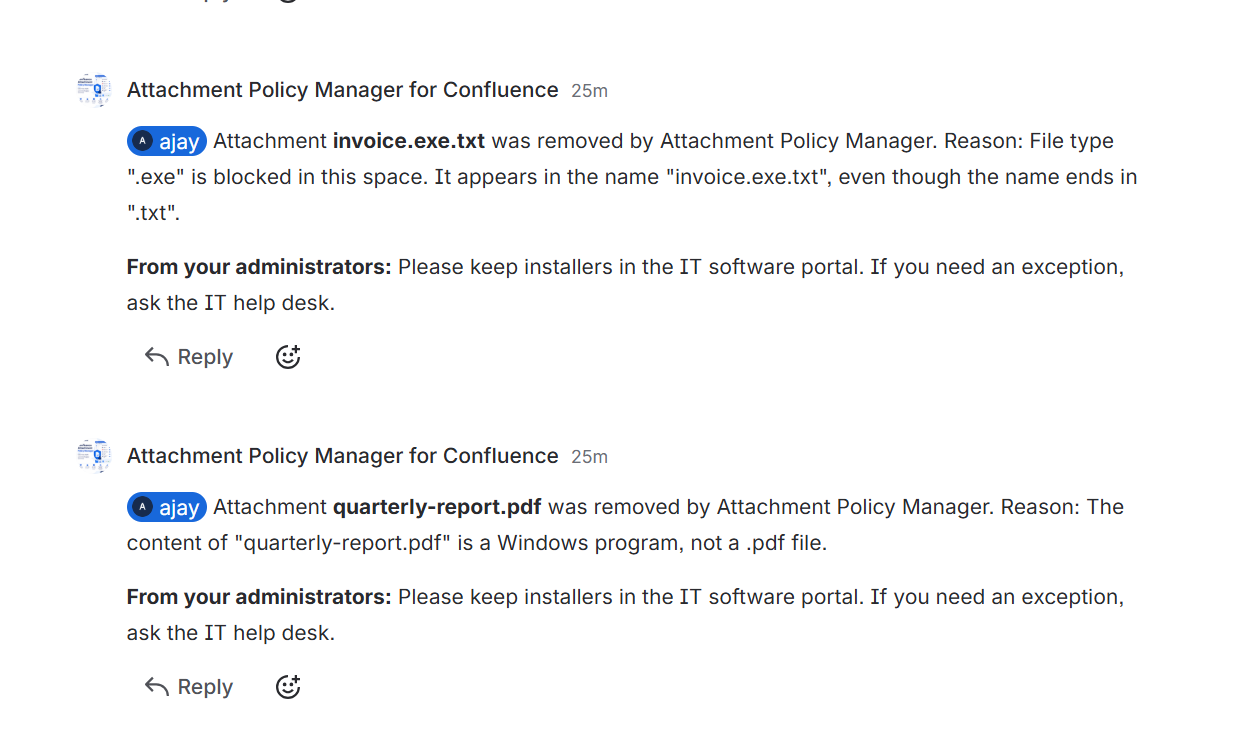
Space administrators configure a policy on a space settings page. When a file that breaks the policy is attached to a page or blog post, the app deletes it, mentions the uploader in a comment explaining why, and records the event.
Policies are stored per space and never shared between them, which is the point: a design space that lives on large images and an HR space that should never receive an executable are not the same problem. A separate cross-space overview page exists because a per-space page cannot show you that difference.
This is the Confluence edition of the Jira Attachment Policy Manager. The policy model, the storage layout and the enforcement pipeline are the same; four things genuinely change when the app is built for Confluence, and each is a place where a straight port would have been wrong.
The app ships free and fully functional. A licensing layer was added in 1.1.0 but is deliberately dormant — app.licensing is absent from the manifest, so nothing is gated and no banner is shown.
Highlights
Off, monitor, enforce
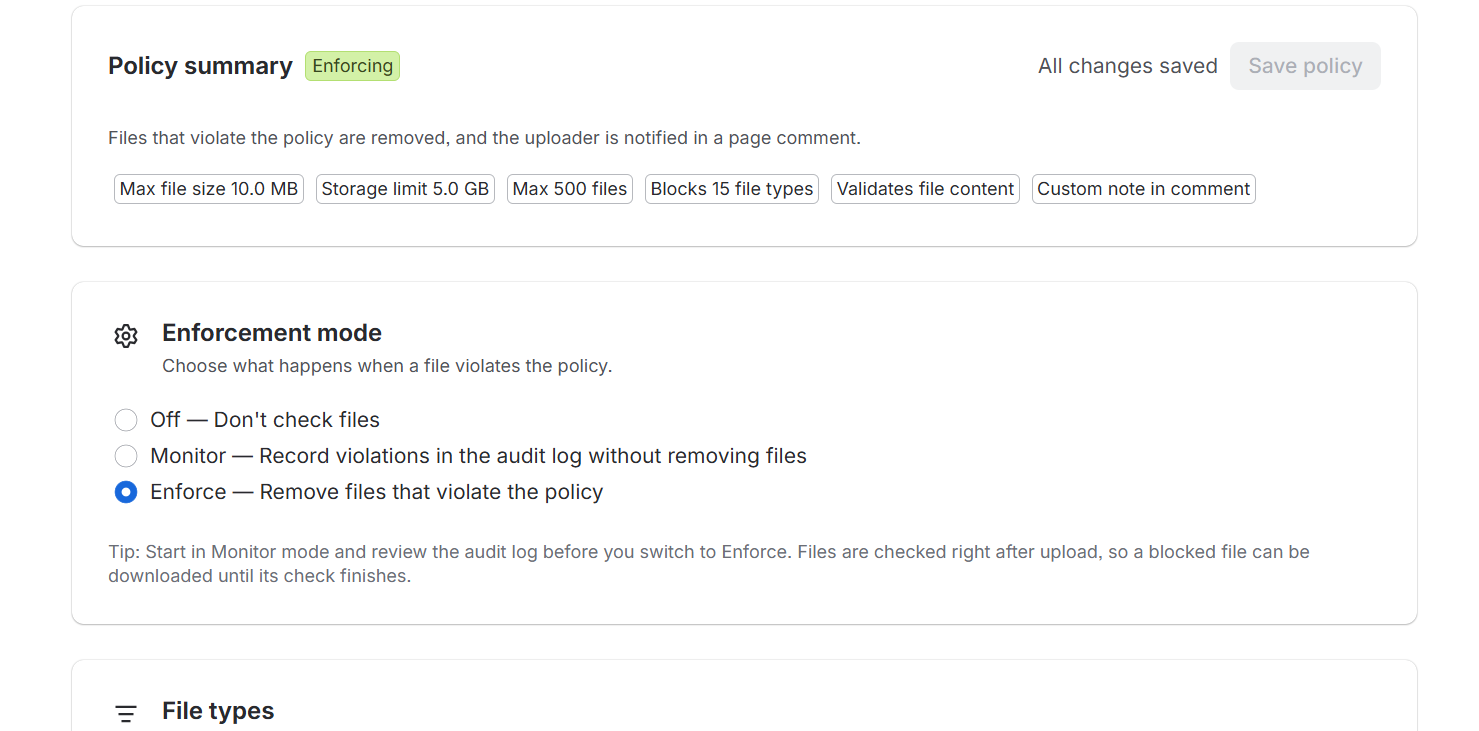
Forge exposes no hook that runs before an attachment is stored, so enforcement is reactive and the app’s only lever is deletion. Monitor mode records violations and leaves files in place — the intended way to roll a policy out across a live space.
A simulator wired to the real evaluator
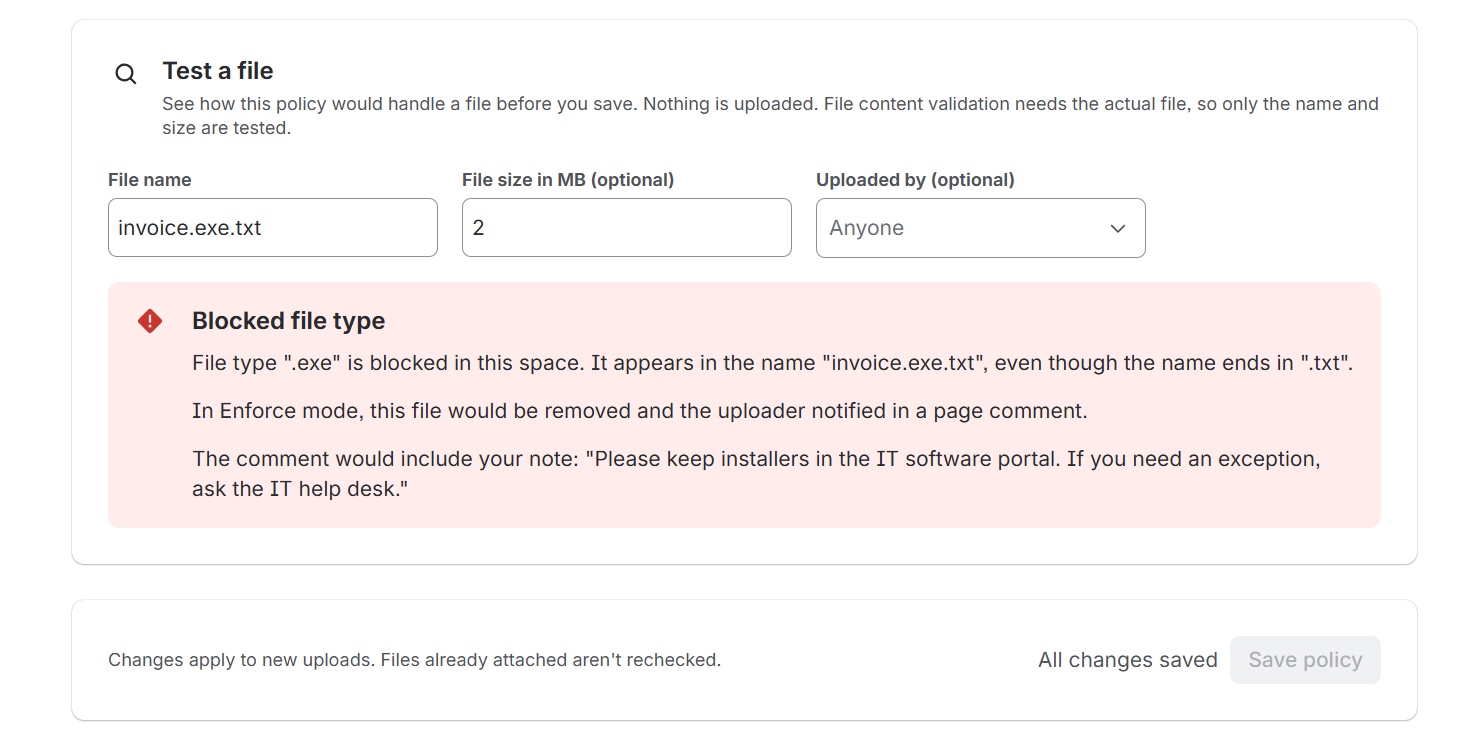
Type a file name and size on the settings page and get the verdict against the policy currently on screen, including unsaved edits, from the same evaluateAttachment the trigger calls.
Double-extension and confusable aware
The block list matches every extension segment, so invoice.exe.txt is caught by blocking exe. The allow list matches the true final extension, read from the raw final segment so a padded name cannot borrow the extension in front of it. Names are Unicode-normalised (NFKC) first, so a full-width setup.exe cannot walk past a rule blocking exe.
Cross-space overview
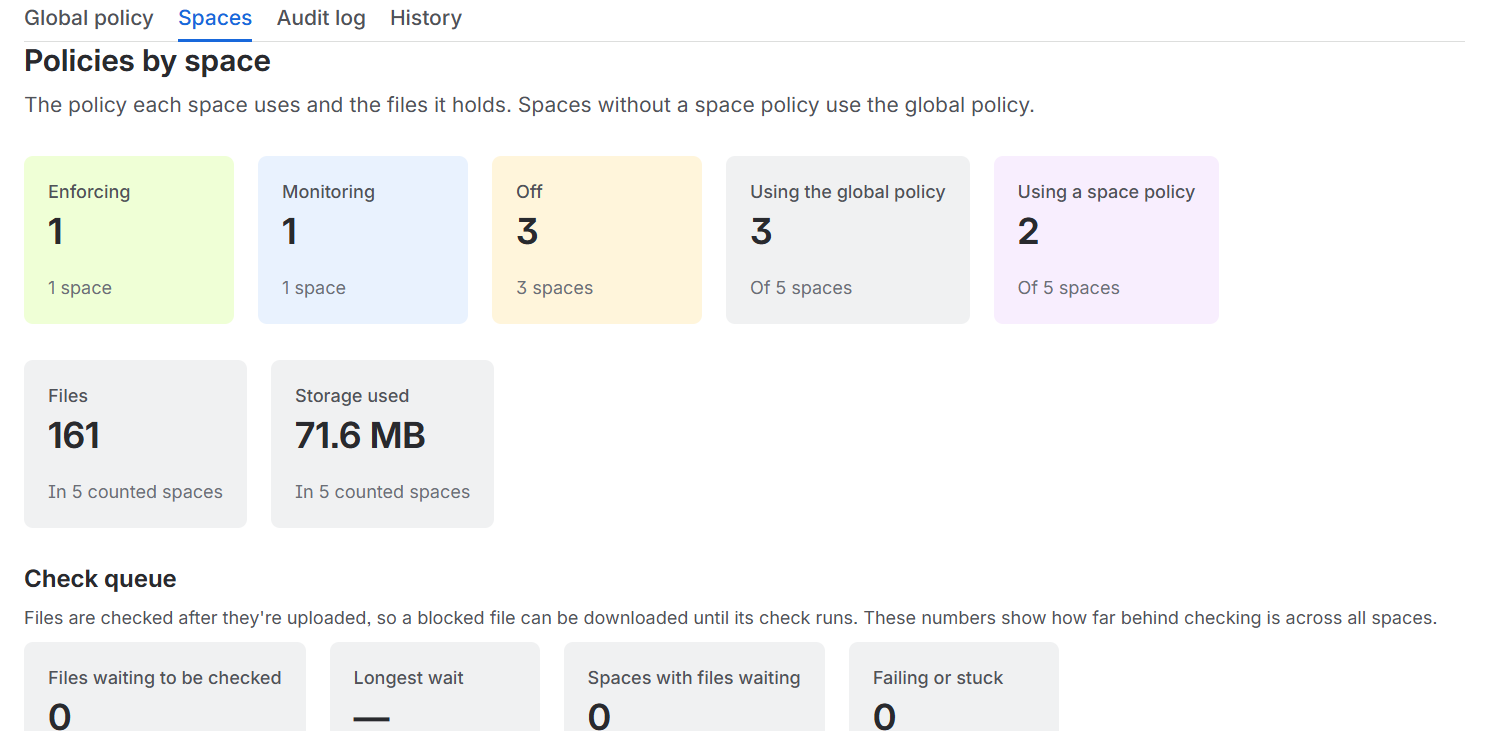
How policy differs from space to space, and which spaces have none — for Confluence administrators only. It pages past the store’s query ceiling and reports if it stopped early rather than presenting a partial list as the whole site.
Attributed policy changes
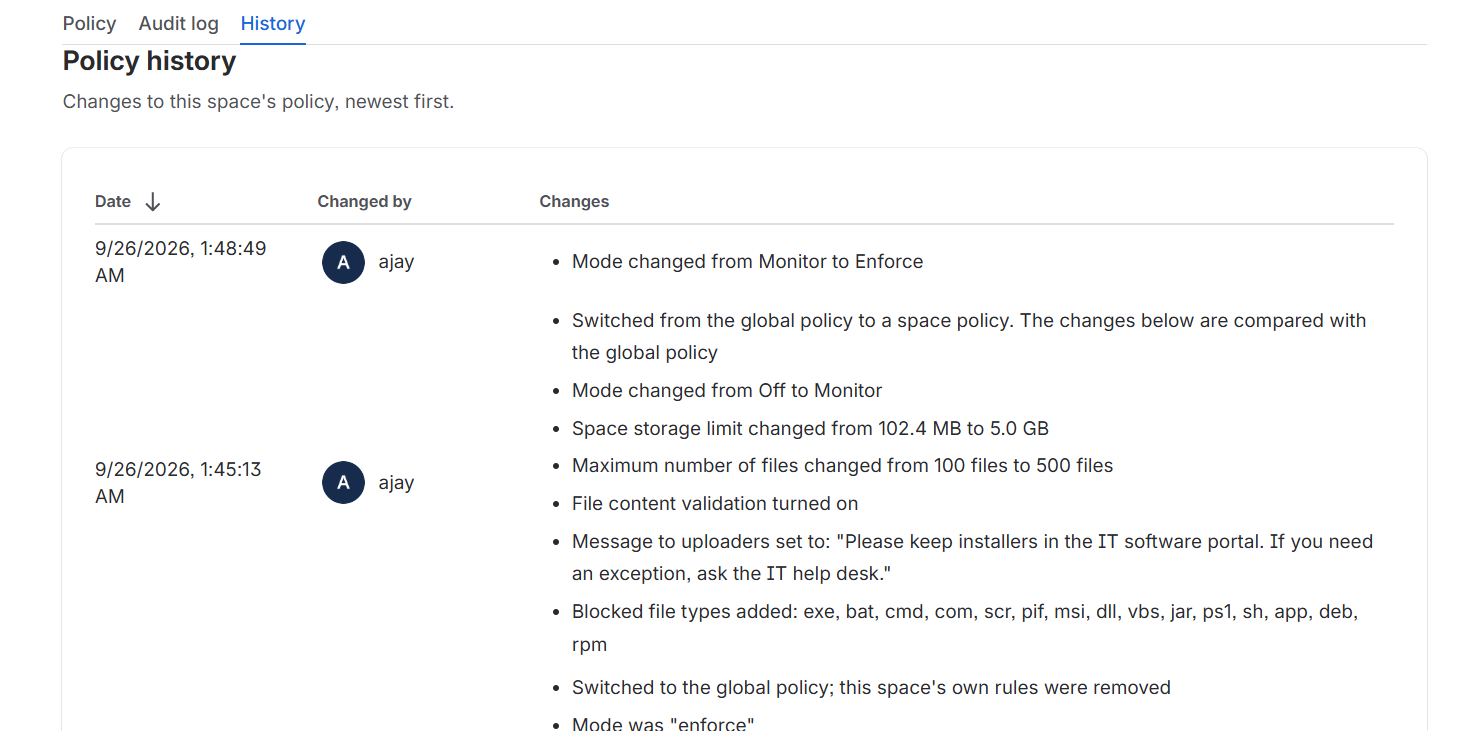
Every change records the account that made it and a description of what changed, including exemptions added — the quietest way to bypass enforcement and therefore the one most worth recording.
Presets validated at build time
The UI’s policy presets are checked against the real validator and evaluator in the test suite, so a preset that could not be saved — or that failed to catch what it advertises — fails the build.
Four things that differ from the Jira edition
The event carries its own scope. avi:confluence:created:attachment includes the space, container, uploader and size on the payload, so the trigger never has to call REST to learn which space it is in — one fewer failure mode. The payload does not use the field names a Jira developer would reach for: the file name is attachment.title, the size is attachment.extensions.fileSize (delivered as a string despite being typed as a number), and the uploader is attachment.history.createdBy.accountId. Reading fileName yields undefined for every attachment and makes the trigger silently do nothing.
Comments are XHTML, not a document tree. Jira comments are ADF, where a file name in a text node is inert whatever it contains. Confluence comments are storage format — a string — so interpolating an attacker-controlled file name unescaped is stored cross-site scripting. Every interpolated value is escaped, & first so later escapes are not themselves escaped, with control characters that are not legal in XML stripped. A test asserts the finished document contains only the four tags the app meant to emit.
An attachment’s container may not take comments. In Jira an attachment always hangs off an issue. In Confluence it can hang off a page, a blog post, or custom content — and custom content takes no comments. The client checks container type before posting, so a file on custom content is still deleted and still recorded; only the explanation has nowhere to go, and the log says so.
Permission checks work differently, and against REST v2. Confluence has no equivalent of Jira’s /mypermissions. What it has is an operations field reporting what the calling user may do: administer/space for a space administrator, administer/application for a site administrator. If a space reports no operations at all, the check falls through to the site-administrator test rather than guessing, logs it, and therefore fails closed.
User guide
Who this is forSpace administrators configuring a policy, and Confluence administrators reviewing the site. No Forge knowledge assumed.
The app watches attachments uploaded to pages and blog posts in your space. When a file breaks the rules you set, it can delete it, explain why in a comment that mentions whoever uploaded it, and record what happened. It cannot stop the upload — Confluence offers no hook that runs before a file is stored — so treat it as cleanup and deterrence, not as a gate.
| Surface | Where to find it |
|---|---|
| Policy, audit log, history | Space settings → Apps → Attachment Policy Manager |
| Cross-space overview | Confluence settings (gear) → Apps → Attachment Policy Overview — Confluence administrators only |
-
Start in monitor mode
Open Space settings → Apps → Attachment Policy Manager and set Mode to Monitor. Switching a destructive policy on across a live space and hoping is not a plan.
Space administrators and Confluence administrators can both use the page. Both count because a Confluence administrator does not necessarily hold space admin on every space, and refusing someone Confluence itself lets into Space settings would look like a fault rather than a decision.
-
Add your rules, or start from a preset
Four presets are offered — Block executables, Images only, Documents only and Cap size at 10 MB. Each fills in the rule fields and leaves the mode alone, so applying one can never switch enforcement on by surprise. Nothing is saved until you click Save policy.
Review what a preset filled in before saving. Documents only on a space where people paste screenshots into pages will delete every screenshot.
-
Check the rules against names you expect
Type a file name — and optionally a size — under Try a file name. The verdict appears immediately, against the rules currently on screen including edits you have not saved, running the same
evaluateAttachmentthe enforcement trigger calls.Uploaded by is optional. Leave it blank for the verdict an ordinary user would get; name someone to check whether their exemption applies.
-
Save, and leave it for a week
The top of the Policy tab always says what is stored — the mode, a one-line summary of the rules, and who last changed them — which is a different question from what is currently typed into the form. While the two differ, an Unsaved changes marker appears and a Discard changes button appears beside Save.
-
Read the audit log before you enforce anything
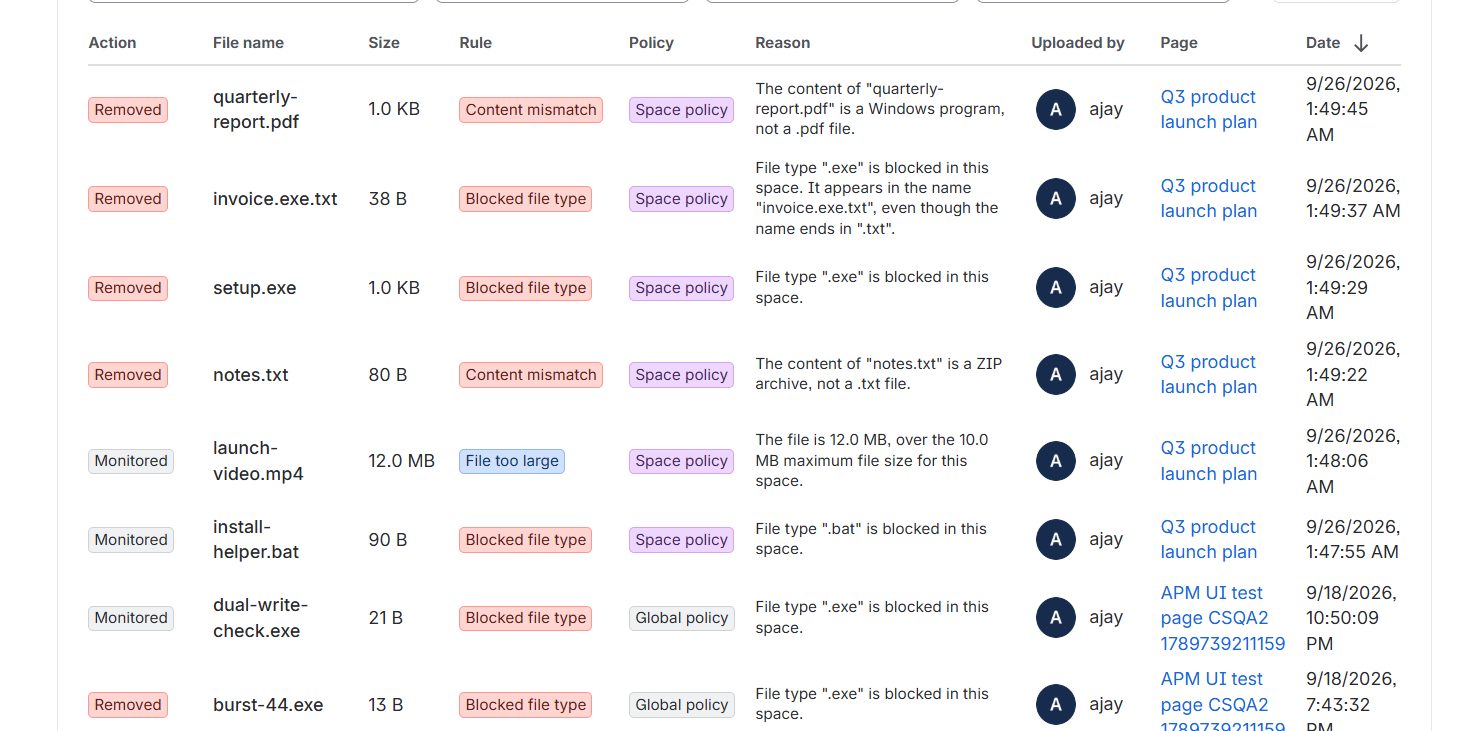
In monitor mode every row is a file that would have been deleted. This step is not optional in spirit: the audit log in monitor mode is the only way to find out what your rules actually match before they start deleting.
If the list contains something you did not intend to catch, fix the rules or exempt the account, then wait again.
-
Switch to enforce
When the audit log contains only what you meant, set Mode to Enforce. From then on a violating file is deleted, the violation recorded, and the uploader mentioned in a footer comment explaining why.
A mode other than Off needs at least one rule; the app refuses to save an enforcing policy that would catch nothing. Off with rules configured is allowed, and is the right way to park a policy you are not ready to run.
The rules, in the order they apply
- 1. Exempt users. Uploads from these accounts are never checked, whatever the rules say. Use it for integrations and service accounts: a sync job attaching a
.jarbuild artefact to a release page is not a threat, and blocking it breaks the job rather than improving security. Every addition is recorded in History with the account that made it. - 2. Blocked extensions. Checked against every dotted segment in the name — so blocking
exealso catchesinvoice.exe.txt. Comma separated; dots and capitals are fine. Names are Unicode-normalised first, so full-width lookalikes are caught too. - 3. Allowed extensions. When set, this list is exclusive: anything not on it is refused, matched against the file’s effective (last) extension. It also refuses files with no extension at all and files whose final extension cannot be read. It does not refuse
report.pdf., because Windows stores that asreport.pdf. - 4. Maximum size. In megabytes;
0means no limit, and anything above 1024 GB is rejected as a typo. If Confluence does not report a readable size, the size rule is skipped rather than guessed at — a file is never deleted on a rule that could not be evaluated. - Reading the audit log: the summary line counts the rows currently loaded, not the whole log, so click Load more through to the end before quoting a number at anyone. Export CSV opens the rows on screen — filters included — as text to copy, because Forge apps cannot save a file to your machine.
- Limits worth knowing: 100 extensions per list, 50 exempt accounts, a 1024 GB size ceiling, 200 audit entries and 100 policy changes kept per space. Export before older entries age out.
If something looks wrong
A file that should have been blocked is still there.
Check the mode is Enforce — Monitor records and deletes nothing. Check the uploader is not on the exempt list. Then try the exact file name in the simulator: if it comes back green, the rules are the problem. Failing that, forge logs -e production --since 15m — every line is tagged [attachment-policy], and confluence.attachment.delete_failed means Confluence refused the deletion.
The file was removed but no comment appeared.
Two causes, both in the log. confluence.comment.skipped means the file was attached to something that does not take comments, such as custom content — the removal is still recorded. confluence.comment.failed means Confluence refused the comment; the app retries once without the mention first, in case the uploader’s account could not be resolved.
Nothing is recorded at all.
Look for event.unusable in the log; it names the field the event was missing. Unlike the Jira edition there is no project lookup to fail, because the space arrives on the event itself.
The page loads for you but not for a space administrator.
Look for permissions.space_operations_missing in the log. Confluence did not report the operations the app reads to identify a space administrator, so only Confluence administrators are being let in. That is deliberate — the check fails closed rather than guessing — but it needs looking at.
What it does not do
- Inspect file contents. It matches on the name and the byte count; a renamed executable with an allowed extension gets through.
- Scan for malware.
- Retroactively check files attached before the policy existed.
- Prevent the upload — the file exists on the page until the trigger runs.
- Apply one policy across spaces. Every space is configured on its own; the overview page shows how they differ, but it does not edit them.
Permissions & scopes
| Scope | Why it's needed |
|---|---|
read:confluence-content.summary | Required by the avi:confluence:created:attachment event subscription itself, independent of any REST call |
delete:attachment:confluence | DELETE /wiki/api/v2/attachments/{id} — removing a rejected attachment |
write:comment:confluence | POST /wiki/api/v2/footer-comments — explaining the removal on the page |
read:space:confluence | GET /wiki/api/v2/spaces and ?include-operations=true — the overview page’s space list and the space administrator check |
read:confluence-user | GET /wiki/rest/api/user?...&expand=operations — the site administrator check |
storage:app | Policies and both logs |
Every scope above except the trigger subscription and storage:app is granular, not classic, and every REST call it backs is v2. That is not stylistic preference: an earlier build used v1 endpoints and the classic scopes covering them, and every one of those calls answered 410 Gone once the app was deployed and calling them as itself. Atlassian has retired several v1 endpoints specifically for app-scoped access while leaving them serving requests from a signed-in browser tab — which is exactly backwards from what manual testing would suggest. The one classic-and-v1 survivor is read:confluence-user, used only because no v2 equivalent exists yet for reading a user’s own operations.
External access
Data stored
| Record | Key | Contents | Retention |
|---|---|---|---|
| Policy | policy:<spaceId> | Mode, size limit, extension lists, exempt account IDs, plus updatedAt and updatedBy | While the app is installed |
| Audit log | audit:<spaceId>:<invertedTs>:<attachmentId> | File name, byte count, the rule that matched, the uploader’s account ID, the container id | Capped at 200 entries per space |
| Policy change log | policyLog:<spaceId>:<invertedTs>:<accountId> | Who changed the policy, when, and what changed | Capped at 100 entries per space |
The store returns keys in ascending order, so an inverted timestamp — a large constant minus the real one — makes newest-first the natural read order and lets the cursor paginate correctly. One key per record means concurrent writes cannot overwrite each other, which a read-modify-write on a single array would. Attribution is stamped by the storage layer from the Forge invocation context rather than from the payload, so a caller cannot record somebody else as the author of their change. Policies written before modes existed carried a boolean enabled; they are migrated on read, so an existing installation upgrades with no migration job.
Security notes
Authorization
- Every resolver re-checks authorization. Being able to see the settings page is not authorization:
invoke()reaches resolvers directly from the browser, so any space member could call them if the check were left to the frontend. - Reads are restricted too, because the policy reveals how to evade it and the audit log contains the names of files people uploaded.
- Permission checks use
.asUser(), so Confluence itself decides the answer and the app never has to model the space permission scheme. - A failed permission check throws rather than returning “not an admin”, so an outage cannot be mistaken for a denial. Only 401, 403 and 404 count as denials; every other status is a fault.
- A space page accepts either the space or the site administrator permission. The cross-space overview requires the site permission alone, because a space administrator has no business reading how every other space is configured.
The enforcement trigger
- The trigger uses
.asApp()because a product trigger has no acting user. It performs no user-supplied action, so no authorization decision is bypassed. - The trigger normalises the policy once, at the top of the pipeline, so no two rules can read a different one.
evaluateAttachment()normalises internally whileisEnforcing()does not, and passing the raw record to both would let a legacy policy evaluate as enforce and then be acted on as monitor — enforcement degrading to silence, which is the one failure a security control must not have.
Injection and evasion resistance
- File names and administrator-entered extensions are Unicode-normalised (NFKC) before any matching happens. Closed in 1.2.0: a file named
setup.exe, using full-width Unicode letters, was not caught by a policy blockingexe— the full-width text lower-cases to itself and never equalled the ASCII entry an administrator typed, so the block silently failed to match a name a person reading it cannot tell apart from the blocked one. Normalisation also folds the full-width dot.to., so a segment boundary cannot be disguised either. Four regression tests cover it, and existing policies started catching these names with no configuration change. - Comment text is XML-escaped, so an attacker-controlled file name cannot inject markup into the rendered comment. Confluence comments are XHTML strings, not a document tree, which makes this the app’s single highest-risk interpolation.
- Mentions use the Cloud form
<ac:link><ri:user ri:account-id="…" /></ac:link>. An account id that does not look like one is dropped rather than embedded, because an unresolvable mention makes Confluence reject the whole comment — which would cost the explanation as well as the notification. - CSV export neutralises formulas. A leading
=,+,-or@is quoted, so a file name cannot execute when the export is opened in a spreadsheet.
Errors and logging
- Expected failures are returned, not thrown. Resolvers answer with
{ ok, data | error }. Throwing reaches the browser as Forge platform plumbing, which reads like a crash rather than a rejected value, and fills the error log with stack traces for administrators’ typos. - Unexpected faults are logged in full and answered with a generic message, because a stack trace is not something to render into an admin screen.
- Every log line is one JSON object behind a fixed prefix, because Forge interleaves output from concurrent invocations and a multi-line record cannot be reassembled. The trigger stamps attachment and space ids onto every line it writes after parsing the event, so one attachment’s journey can be followed with a single filter in
forge logs.
Dependencies
npm auditreports advisories reaching this app transitively through@forge/reactand@forge/bridge. Neither is reachable in this app’s usage — one needs the Atlaskit editor, which is never mounted; the other needs auuidcall this app never makes.- npm’s only offered remedy is a major-version downgrade of the Forge SDK, which is a worse trade. Revisited whenever Atlassian ships refreshed Atlaskit dependencies.
Testing
- The suite runs on Node’s built-in test runner, so there is no test framework dependency.
src/lib/*is pure and tested directly; the storage, permission, Confluence and trigger layers are tested through their factories against in-memory fakes, so the suite exercises production logic rather than a parallel copy of it. - UI Kit components only render inside the Forge runtime, so what a component decides lives outside the component and is unit tested: table sorting and CSV contents, unsaved-change detection and megabyte conversion, the space/policy join on the overview, and which failures are decisions versus faults.
- The sorting tests run against a copy of DynamicTable’s own comparator, because the bug they guard against is not bad arithmetic but a misreading of what DynamicTable sorts by.
- What no unit test can cover is behaviour against a live Confluence site — in particular the two permission reads. Section 1 of the UI test plan walks those on a real site.
Known limitations
- Enforcement is reactive. Confluence exposes no pre-store hook, so a violating file exists briefly before the trigger removes it.
- File content is not inspected. Matching is on file name and byte count only.
- Custom content takes no comments. A file attached to custom content is still deleted and recorded, but the explanation has nowhere to be posted.
- Retention is capped at 200 audit entries and 100 policy change entries per space.
- The site-administrator check still depends on a v1 user endpoint. If Atlassian retires it for app-scoped access the way it did for spaces and content, that check will fail the same way — as a thrown, logged error rather than a silent “not an admin”.
Release notes
Version history for Attachment Policy Manager for Confluence. The most recent release is listed first.
-
v1.2.0 August 13, 2026 Current
A block-list evasion closed, plus the documents a Marketplace listing requires.
Security
- Closed a block-list evasion using Unicode confusables. A file named
setup.exe, using full-width Unicode letters, was not caught by a policy blockingexe: the full-width text lower-cases to itself and never equalled the ASCII entry an administrator typed, so the block silently failed to match a name a person reading it cannot tell apart from the blocked one. - File names and administrator-entered extensions are now Unicode-normalised (NFKC) before any matching happens. This also folds the full-width dot
.to., so a segment boundary cannot be disguised either. - If you rely on a block list, this is worth upgrading for. No configuration changes are needed — existing policies start catching these names immediately. Four regression tests cover it.
Documentation
- Added
SECURITY.md: scopes, stored data and retention, the authorization model, injection and evasion resistance, and vulnerability reporting with response-time commitments. - Added
LICENSE. The source is proprietary;package.jsonpreviously declaredMITwith no licence file present, which was incorrect and would have permitted anyone to fork and relist the app. - Added the draft Marketplace listing.
- Closed a block-list evasion using Unicode confusables. A file named
-
v1.1.0 August 13, 2026
Licensing groundwork. No behaviour changes.
The app is free and fully functional, and every feature is available on every install. This release only puts the machinery in place.
- Added the licensing layer ported from the Jira edition — a licence model, a status resolver, a banner component and a gate on
setPolicy. - All of it is dormant.
app.licensingis deliberately absent frommanifest.yml, so no licence reaches the invocation context, the reader reports the state as unknown, and every caller treats the site as licensed. No banner is shown and nothing is gated. - The point of adding it now is that a future move to paid becomes a two-line manifest change rather than a feature build under time pressure. When that happens, Forge will treat every existing installation as unlicensed until a site administrator subscribes, so the change will be announced in-app well before it takes effect — and policies and audit history are never deleted by a licensing change.
- Added the licensing layer ported from the Jira edition — a licence model, a status resolver, a banner component and a gate on
-
v1.0.0 August 7, 2026
Initial release.
What it does
- Per-space attachment rules for Confluence: block or allow by extension, cap by size, exempt specific accounts.
- Three modes — off, monitor, enforce.
- An audit log of every attachment the policy acted on, and an attributed change log of every policy edit.
- A simulator on the settings page, running the same evaluation function as the enforcement trigger, against unsaved edits.
- A cross-space overview for Confluence administrators, including spaces with no policy.
- Policy presets, validated against the real validator and evaluator in the test suite.
Built for Confluence, not ported
- The trigger reads the Confluence payload field names explicitly (
attachment.title,attachment.extensions.fileSize,attachment.history.createdBy.accountId) rather than the Jira spellings, which yieldundefinedand make the trigger silently do nothing. - Rejection comments are built as escaped storage-format XHTML rather than an ADF document tree, closing a stored cross-site scripting path that the Jira edition does not have.
- Container type is checked before a comment is posted, because custom content accepts none.
- Permission checks read the
operationsfield on the space and on the calling user, and fall through to the site-administrator test — failing closed — when a space reports no operations at all.
Platform notes closed during development
- Every REST call was migrated from v1 to v2. The v1 endpoints worked when tested by hand from a signed-in browser tab and answered
410 Gonethe moment the deployed app called the identical path as itself — which affected the space permission check, attachment deletion and comment posting alike. - Scopes were narrowed from classic to granular in the same change.
Get it & contact
Vendor
AryonForge
Support
Security
App ID
ari:cloud:ecosystem::app/07e248fe-8426-48a9-b4e5-096c16a6217d